Windows下安装 MSMPI
下载安装包及环境变量设置
下载安装msmpi以及msmpisdk:MSMPI github releases。注意安装路径不要有空格及中文。
命令行设置:
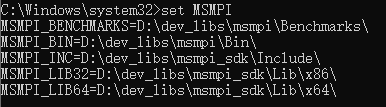
set MSMPI
输出信息如下图所示:
建立第一个测试程序
find_package(MPI REQUIRED)

# list(APPEND myMPI_INC_DIR $ENV{MSMPI_INC})
# list(APPEND myMPI_LIBS $ENV{MSMPI_LIB64})
message(STATUS "MPI_FOUND=${MPI_FOUND}")
message(STATUS "MPI_CXX_INCLUDE_DIRS=${MPI_CXX_INCLUDE_DIRS}")
message(STATUS "MPI_LIBRARIES=${MPI_LIBRARIES}")
#include <mpi.h>
#include <stdio.h>

int main(int argc, char** argv) {
  // Initialize the MPI environment
  MPI_Init(&argc, &argv);

  // Get the number of processes ssociated with the communicator
  int world_size{};
  MPI_Comm_size(MPI_COMM_WORLD, &world_size);

  // Get the rank of the calling process
  int world_rank{};
  MPI_Comm_rank(MPI_COMM_WORLD, &world_rank);

  // Get the name of the processor
  char processor_name[MPI_MAX_PROCESSOR_NAME]{};
  int name_len;
  MPI_Get_processor_name(processor_name, &name_len);

  printf("Hello world from process %s with rank %d out of %d processors\n", processor_name, world_rank, world_size);

  // Finalize: Any resources allocated for MPI can be freed
  MPI_Finalize();
}
教程参考
Enjoy Reading This Article?
Here are some more articles you might like to read next: