CUTLASS-Cute 初步(1):Layout
Cute(CUDA Tensor) 是 CUBLASS 扩展,用于简化张量 BLAS 操作和内存布局的管理。
最主要的概念是 Tensor 和 Layout:
- Layout<Shape, Stride>: 定义张量的内存布局,用于将一维内存地址映射到多维张量索引。
- Shape:Logical dimensions,张量的逻辑维度/形状。
- Stride:Physical steps,每一个维度在内存中的步长/跨度。
- Tensor<Engine,Layout>: 定义张量的数据类型/存储和布局。
映射公式:
1
offset = Σ (index[i] * stride[i])
Layout 本质是一个映射函数,将多维索引映射到一维内存地址。称索引为定义域(domain),映射得到的地址为值域(codomain)。以一个一维映射为例:
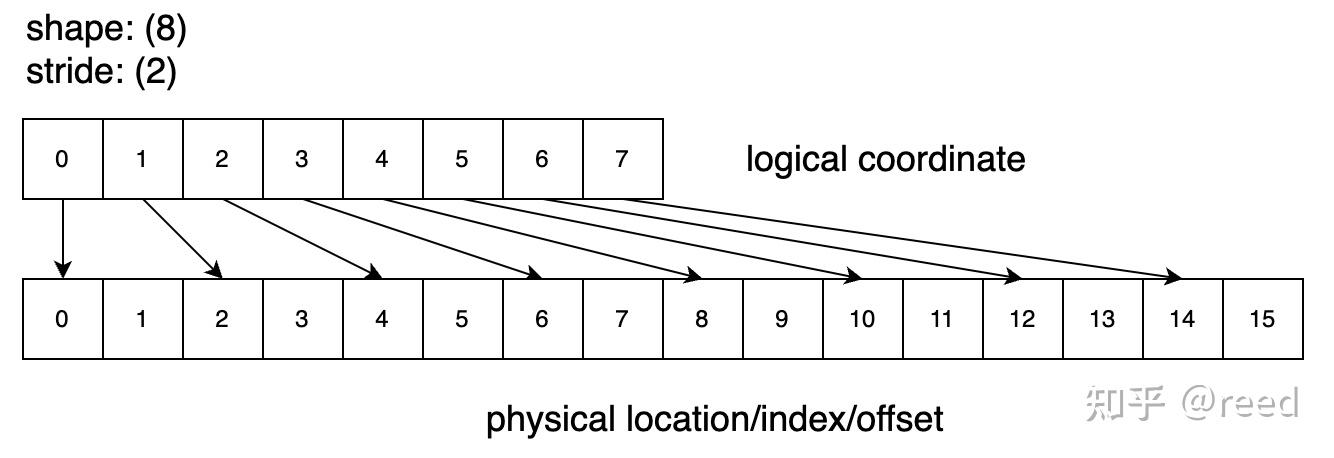
如上图 layout (8):(2),按照映射公式得到 index_phy = index_logic * 2,将连续以一维索引 0,1,2,…7 映射到内存地址 0,2,4,…14。此时:
- size(layout) = 8
- cosize(layout) = 16
而如果定义 layout (8):(0),则所有逻辑索引都映射到内存地址偏移 0,即所有索引映射到同一个地址。此时得到:
- size(layout) = 8
- cosize(layout) = 1
1. Layout 示例
1.1. 例一:定义一个两行三列的矩阵布局,这个矩阵采用列主序存储
1
2
3
4
    auto tensor_shape = make_shape(2, 3);   // 两行三列
    auto tensor_stride = make_stride(1, 2); // 列主序存储
    auto tensor_layout = make_layout(tensor_shape, tensor_stride);
    print_layout(tensor_layout);
输出:
1
2
3
4
5
6
7
(2,3):(1,2)
      0   1   2
    +---+---+---+
 0  | 0 | 2 | 4 |
    +---+---+---+
 1  | 1 | 3 | 5 |
    +---+---+---+
1
2
// A(m, n) = storage[m*1 + n*2]
const auto val = tensor_layout(1, 2); // 访问张量元素 (1,2),值为 5
1.2. 例二:定义一个两行三列的矩阵,这个矩阵采用行主序存储
1
2
3
4
    auto tensor_shape = make_shape(2, 3);   // 两行三列
    auto tensor_stride = make_stride(3, 1); // 行主序存储
    auto tensor_layout = make_layout(tensor_shape, tensor_stride);
    print_layout(tensor_layout);
输出:
1
2
3
4
5
6
7
(2,3):(3,1)
      0   1   2
    +---+---+---+
 0  | 0 | 1 | 2 |
    +---+---+---+
 1  | 3 | 4 | 5 |
    +---+---+---+
1.3. 例三:定义一个三维张量布局
- 张量形状:(4,2,2),dim0=4, dim1=2, dim2=2
- 张量步长:(4,1,2) 行主序存储,子 tensor 为列主序
1
2
3
4
    auto tensor_shape = make_shape(4, make_shape(2, 2));
    auto tensor_stride = make_stride(4, make_stride(1, 2));
    auto tensor_layout = make_layout(tensor_shape, tensor_stride);
    print_layout(tensor_layout);
输出:
1
2
3
4
5
6
7
8
9
10
11
    (4,(2,2)):(4,(1,2))
           0    1    2    3
        +----+----+----+----+
     0  |  0 |  1 |  2 |  3 |
        +----+----+----+----+
     1  |  4 |  5 |  6 |  7 |
        +----+----+----+----+
     2  |  8 |  9 | 10 | 11 |
        +----+----+----+----+
     3  | 12 | 13 | 14 | 15 |
        +----+----+----+----+
1
2
// A(i, (j, k)) = storage[i*4 + j*1 + k*2]
const auto val1 = tensor_layout(2, make_coord(1, 0)); // 访问张量元素 (2,(1,0)),值为 9
1.4. 例四:定义一个三维张量布局
- 张量形状:(4,2,2),dim0=4, dim1=2, dim2=2
- 张量步长:(2,1,8)
1
2
3
4
    auto tensor_shape = make_shape(4, make_shape(2, 2));
    auto tensor_stride = make_stride(2, make_stride(1, 8));
    auto tensor_layout = make_layout(tensor_shape, tensor_stride);
    print_layout(tensor_layout);
输出:
1
2
3
4
5
6
7
8
9
10
11
    (4,(2,2)):(2,(1,8))
           0    1    2    3
        +----+----+----+----+
     0  |  0 |  1 |  8 |  9 |
        +----+----+----+----+
     1  |  2 |  3 | 10 | 11 |
        +----+----+----+----+
     2  |  4 |  5 | 12 | 13 |
        +----+----+----+----+
     3  |  6 |  7 | 14 | 15 |
        +----+----+----+----+
1
2
// A(i, (j, k)) = storage[i*2 + j*1 + k*8]
const auto val1 = tensor_layout(2, make_coord(1, 0)); // 访问张量元素 (2,(1,0)),值为 5
几何解释:
1
2
3
内存布局(一维):
[0][1][2][3][4][5][6][7] | [8][9][10][11][12][13][14][15]
 ←───── 块 k=0 ─────→     ←────── 块 k=1 ──────→
| Stride 分量 | 值 | 含义 |
|---|---|---|
| stride_i | 2 | 沿 i 方向移动一步,offset 增加 2 |
| stride_j | 1 | 沿 j 方向移动一步,offset 增加 1 |
| stride_k | 8 | 沿 k 方向移动一步,offset 增加 8(跳到另一个块) |
关于几何解释,更多理解内容参考帖子 https://note.gopoux.cc/hpc/cute/layout/
1.5. CuTe IntTuple
定义多维 Tensor 时,可以使用嵌套的 Shape 和 Stride 来定义子 Tensor 的形状和步长。在 Cute 中,使用 template tuple 表示表示嵌套的 Shape 和 Stride。
具体是使用 IntTule 表示:IntTuple 可以是一个整形,也可以是一个 tuple,并且可以嵌套。以下都是一个合法的 IntTuple:
- int{3},运行时整数。
- Int<3>{},Int<3>() 编译时整数,称为静态整数。另外,定义了一些字面量:比如
_1、_2、_3分别定义为 Int<1>{}、Int<2>{}、Int<3>{}。 - 带有任何模板参数的 IntTuple,比如 make_tuple(int{2}, Int<3>{})。
在对 layout 进行一些操作时,还定义了一些常量表示这些操作:
- cute::_ : 获取 slice 时,表示或者这个维度(轴)的所有数据,在 Python 中类似于
:。 - cute::X :在切分操作(比如partition)的时候,表示不对这个维度进行切分。
2. Hierarchy Layout
层级化的 layout 概念用于更加直观的表示多维 tensor,拆分 layout 划分工作,更好的表示内存局部性,如 TV layout。
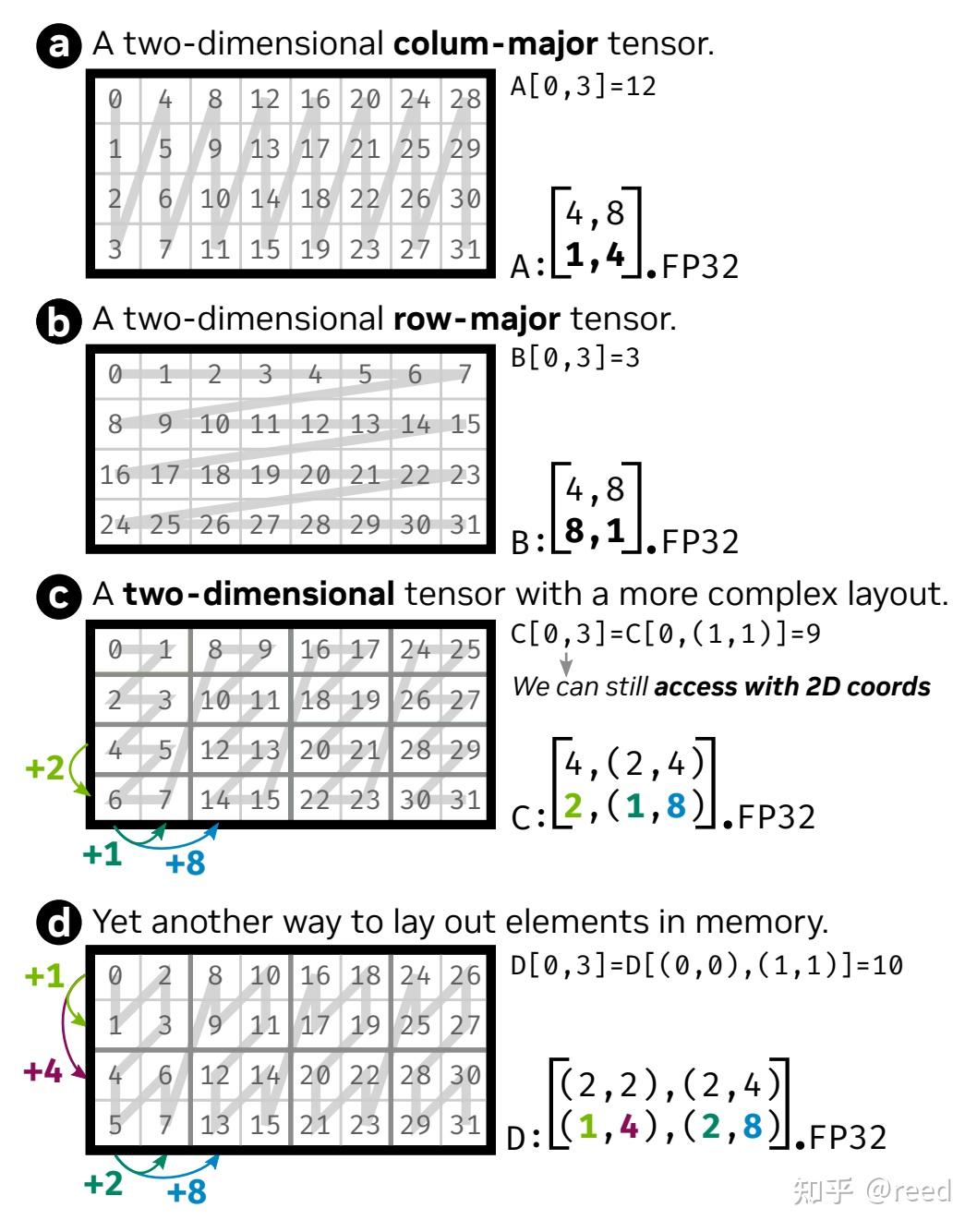
上图示例中,a, b 情形分别表示 column-major 和 row-major 布局的二维矩阵,不存在嵌套。
2.1. 嵌套 layout 示例 c
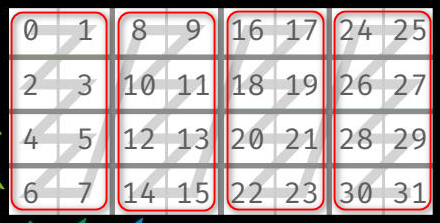
示例 c 中,可以将其看作一个嵌套的 layout:在列方向上存在一个嵌套的 layout。
- 内层 layout (红色框内)为: (4, 2):(2, 1)。
- 外层 layout 为: (1, 4):(4, 1)。即外层 layout 是一个有 1 行 4 列的矩阵(向量),每个元素是一个内层 layout。
合并之后,表示 4 行 8 列。其中,列方向为两个层次:(2, 4),2 表示内层 layout 的列数,4 表示外层 layout 的列数。
综合起来的 shape 为 (4, (2, 4)),其含义为(按顺序表示):第一个 4 表示行数,2 表示内层 layout 列数,第二个 4 表示外层 layout 列数。
针对 stride,其表示顺序要与 shape 保持一致,即 如果 shape 为 (sx, (sy, sz)),则 stride 为 (dx, (dy, dz))即 stride(2, (1, 8)) 的含义如下:
- dx:内层 layout 行方向的间隔为 2。注意:这里解读为内层 layout 的行方向间隔,这个 layout 在行方向上没有外层。
- dy:内层 layout 列方向的间隔为 1。
- dz:外层 layout 列方向的间隔为 8,即为一个内层 layout 块的大小。
综合得到 layout 为 (4, (2, 4)):(2, (1, 8))。
2.2. 嵌套 layout 示例 d
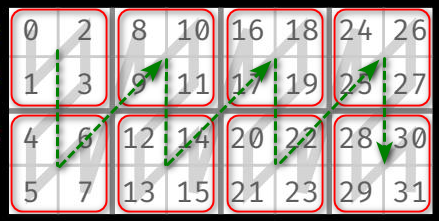
示例 d 的 layout 在行列方向上均存在嵌套 layout。两层 layout 分别为:
- 内层 layout (红色框内)为: (2, 2):(2, 2)。
- 外层 layout 为: (2, 4):(4, 1)。
合并之后,表示 4 行 8 列。其中,行方向为两个层次:(2, 2),列方向为两个层次:(2, 4)。即:
- ((sx1, sx2):(sy1, sy2)),得到综合 shape 为 ((2, 2), (2, 4))。
- sx1 表示内层 layout 行数,sx2 表示外层 layout 行数;
- sy1 表示内层 layout 列数,sy2 表示外层 layout 列数。
- 对应的,综合 stride 为 ((dx1, dx2), (dy1, dy2)),得到((1, 4), (2, 8))。
2.3. 坐标及数据访问 coordinate
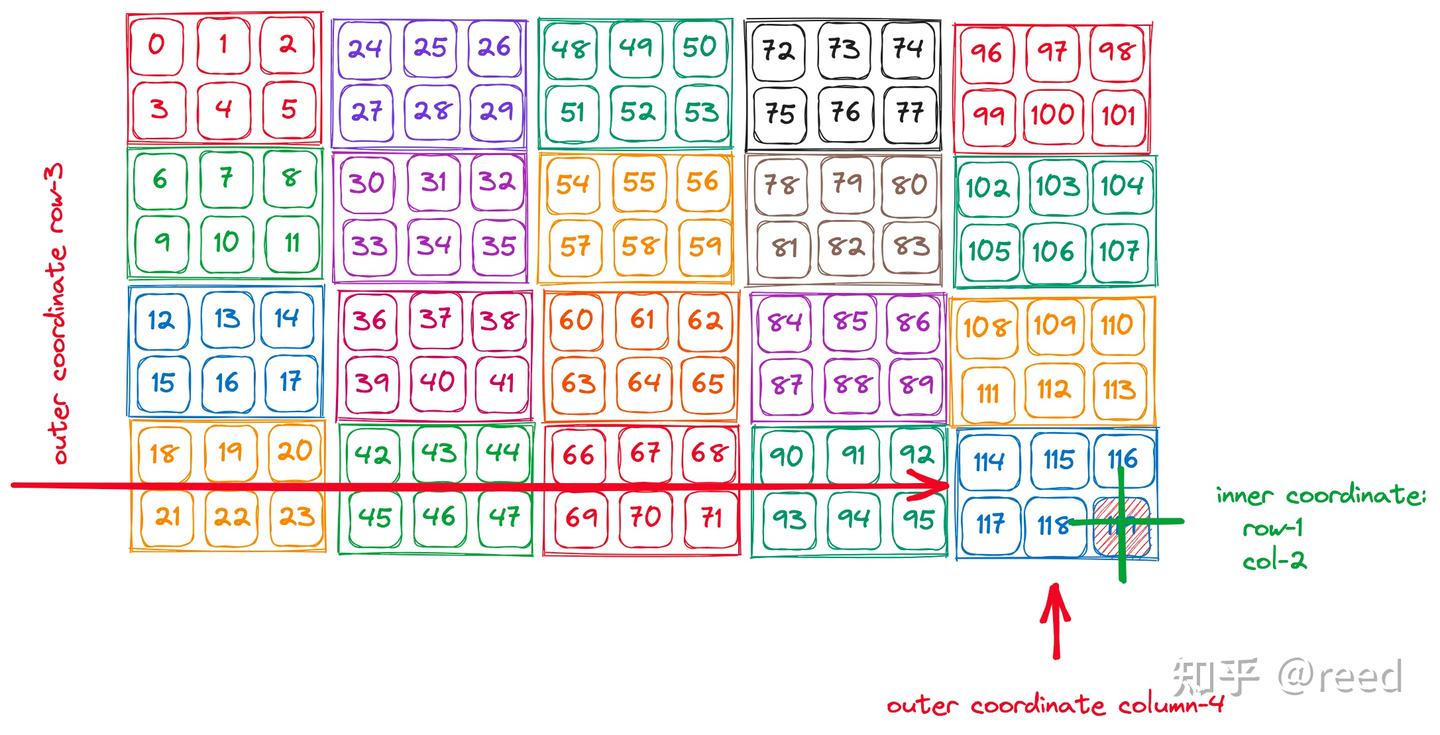
对一个 layout 为 ((2, 4), (3, 5)):((3, 6), (1, 24)) 的 tensor 进行数据访问时,其访问格式遵从上述的顺序,形式为:
1
2
3
auto row_coord = make_coord(1, 3);
auto col_coord = make_coord(2, 4);
auto coord = make_coord(row_coord, col_coord);
如下图所示:
2.4. slice 操作
CuTe 提供了 slice 函数,使用 UnderScore cute::_,用于获取指定维度的子 layout。如下图所示:
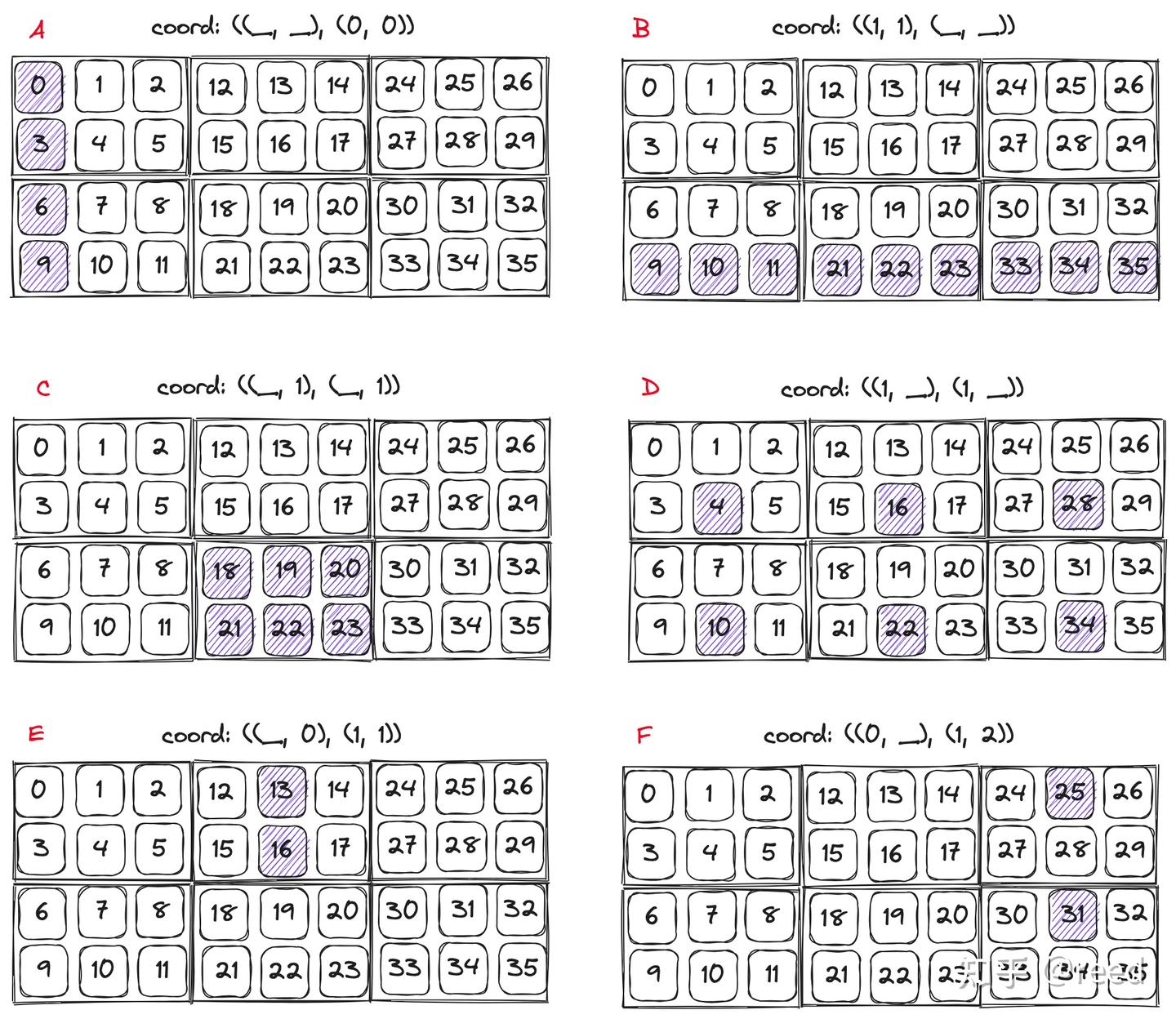
使用方式如下:
1
2
3
4
5
6
7
8
9
auto layout = make_layout(
    make_shape(make_shape(2, 4), make_shape(3, 5)),
    make_stride(make_stride(3, 6), make_stride(1, 24))
);

auto row_coord = make_coord(1, 1);
auto col_coord = make_coord(cute::_, cute::_);
auto coord = make_coord(row_coord, col_coord); // 获取子块 B
auto sub_layout = cute::slice(coord, layout);