CUTLASS-Cute 初步(5):TV Layout
CUTLASS-Cute 初步(5):TV Layout
TV-Layout 描述的是线程在 CTA 中的分布,以及每个线程处理的数据布局。TV-Layout 的第一个 mode 定义线程在 CTA 中的分布,第二个 mode 定义每个线程处理的数据布局。
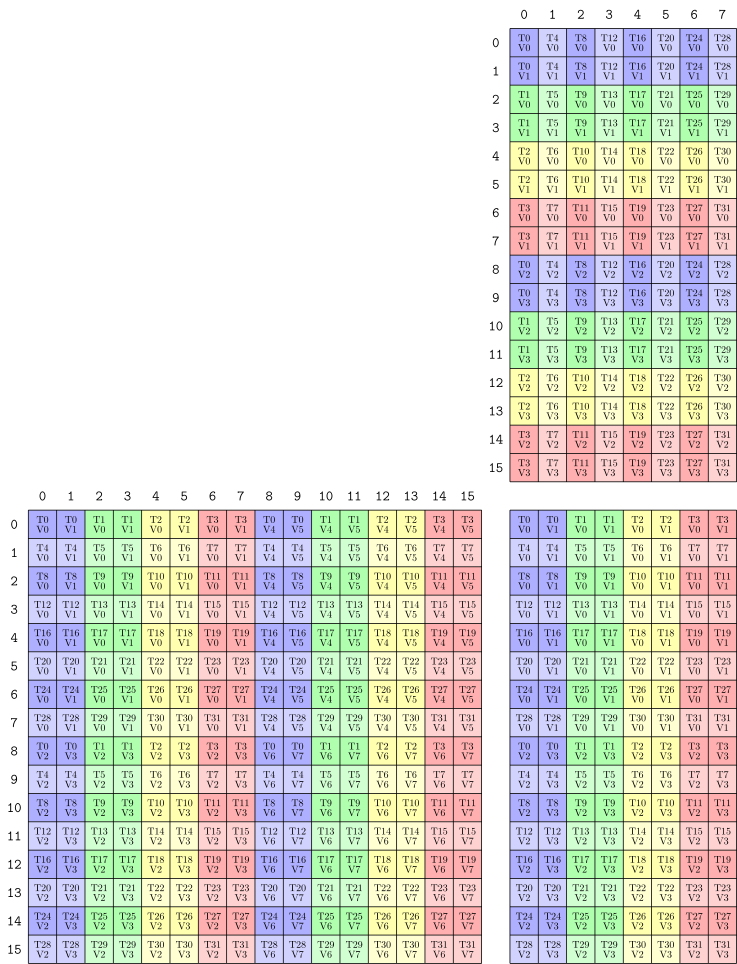
Inverse TV-Layout 描述的是数据的逻辑坐标 coord 到线程ID的映射关系。比如 CopyOperation、MMAOperation 中,使用 print_latex、print_svg 打印的 layout,实际上是 Inverse TV-Layout。
1. TV-Layout 例子
以 cute::SM80_16x8x16_F16F16F16F16_TN 为例,其 TV-Layout 如下:
1
2
3
4
5
6
MMA_Atom
  ThrID:      _32:_1
  Shape_MNK:  (_16,_8,_16)
  LayoutA_TV: ((_4,_8),(_2,_2,_2)):((_32,_1),(_16,_8,_128))
  LayoutB_TV: ((_4,_8),(_2,_2)):((_16,_1),(_8,_64))
  LayoutC_TV: ((_4,_8),(_2,_2)):((_32,_1),(_16,_8))
MMAOperation 以及 MMA_Traits 定义如下:
1
2
3
4
5
6
7
8
9
10
11
12
13
14
15
16
17
18
19
20
21
22
23
24
25
26
27
28
29
30
31
32
33
34
35
36
37
38
39
40
41
42
43
44
45
46
47
// MMA 16x8x16 TN
struct SM80_16x8x16_F16F16F16F16_TN
{
  using DRegisters = uint32_t[2];
  using ARegisters = uint32_t[4];
  using BRegisters = uint32_t[2];
  using CRegisters = uint32_t[2];

  CUTE_HOST_DEVICE static void
  fma(uint32_t      & d0, uint32_t      & d1,
      uint32_t const& a0, uint32_t const& a1, uint32_t const& a2, uint32_t const& a3,
      uint32_t const& b0, uint32_t const& b1,
      uint32_t const& c0, uint32_t const& c1)
  {
#if defined(CUTE_ARCH_MMA_SM80_ENABLED)
    asm volatile(
      "mma.sync.aligned.m16n8k16.row.col.f16.f16.f16.f16 "
      "{%0,  %1},"
      "{%2,  %3,  %4,  %5},"
      "{%6,  %7},"
      "{%8,  %9};\n"
      : "=r"(d0), "=r"(d1)
      :  "r"(a0),  "r"(a1),  "r"(a2),  "r"(a3),
         "r"(b0),  "r"(b1),
         "r"(c0),  "r"(c1));
#else
    CUTE_INVALID_CONTROL_PATH("Attempting to use SM80_16x8x16_F16F16F16F16_TN without CUTE_ARCH_MMA_SM80_ENABLED");
#endif
  }
};

template <>
struct MMA_Traits<SM80_16x8x16_F16F16F16F16_TN>
{
  using ValTypeD = half_t;
  using ValTypeA = half_t;
  using ValTypeB = half_t;
  using ValTypeC = half_t;

  using Shape_MNK = Shape<_16,_8,_16>;
  using ThrID   = Layout<_32>;
  using ALayout = Layout<Shape <Shape < _4,_8>,Shape < _2,_2,  _2>>,
                         Stride<Stride<_32,_1>,Stride<_16,_8,_128>>>;
  using BLayout = Layout<Shape <Shape < _4,_8>,Shape <_2, _2>>,
                         Stride<Stride<_16,_1>,Stride<_8,_64>>>;
  using CLayout = SM80_16x8_Row;
};
打印的 inverse TV-Layout 如下:
2. 使用 TV-Layout 切分数据
使用 TV-Layout 切分 CTA 的 tile 数据到线程得到线程的 sub-tile,使用 TV-Layout 比使用 local_tile、local_partition 简洁:只需要使用 TV-Layout 对输入的 layout 应用 composition 操作。
1
2
3
4
5
6
7
8
9
10
11
12
// Construct a TV-layout that maps 8 thread indices and 4 value indices
//   to 1D coordinates within a 4x8 tensor
// (T8,V4) -> (M4,N8)
auto tv_layout = Layout<Shape <Shape <_2,_4>,Shape <_2, _2>>,
                        Stride<Stride<_8,_1>,Stride<_4,_16>>>{}; // (8,4)

// Construct a 4x8 tensor with any layout
Tensor A = make_tensor<float>(Shape<_4,_8>{}, LayoutRight{});    // (4,8)
// Compose A with the tv_layout to transform its shape and order
Tensor tv = composition(A, tv_layout);                           // (8,4)
// Slice so each thread has 4 values in the shape and order that the tv_layout prescribes
Tensor  v = tv(threadIdx.x, _);                                  // (4)
资料
- CuTe Thread-Value Layout:Mao Lei 的博客文章
- Cute概念速通:待阅读
本文由作者按照 CC BY 4.0 进行授权